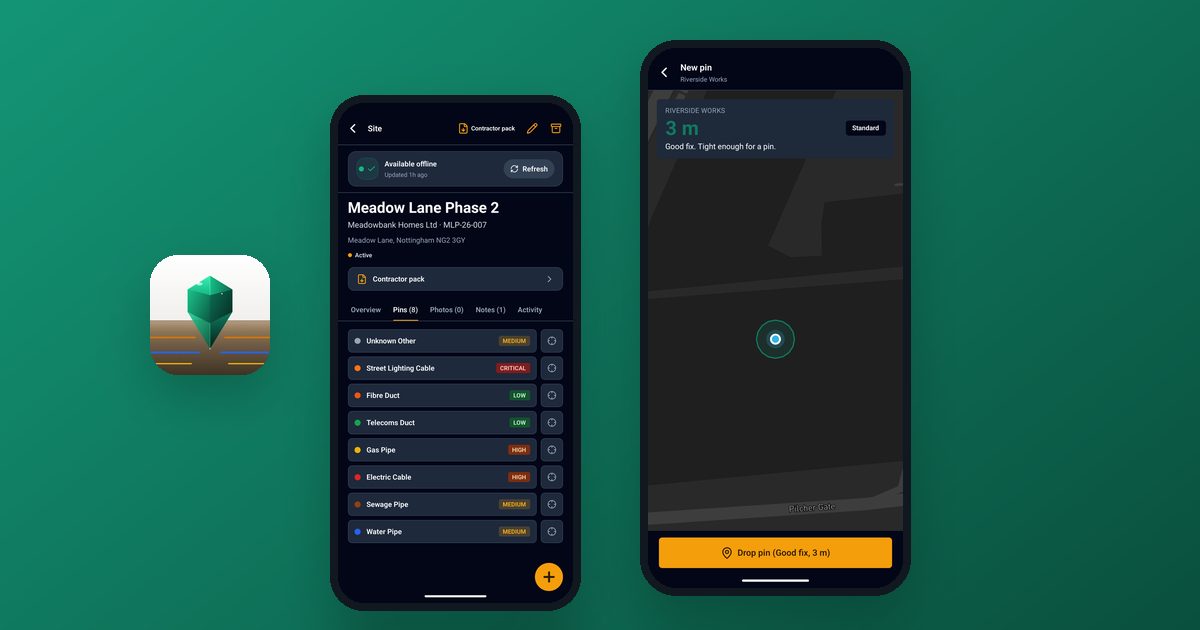
GroundPin is a mobile and web app that UK construction crews use to record what they uncover underground: where it was, how well the phone knew that, what it looked like and how it was located. We designed and built it at D4N, and it is live on iPhone, iPad and Android with a web dashboard for the office.
This post is a plain-English account of how it was built, written for anyone thinking about commissioning an app or a SaaS product.
The problem: what a crew finds is known for a day, then lost
When a crew digs, they find things: a duct nobody expected, a cable at a different depth to the drawing, a pipe that isn't where the records say. That knowledge usually lives in someone's head or a few phone photos for a day or so. Then the trench is backfilled and it is gone. The next crew starts from the same incomplete information.
The idea behind GroundPin is simple: record it at the moment of discovery, in a form the next crew can trust and weigh properly. The hard part is not the idea. It is making that work on a real site, with muddy gloves, a phone in a high-vis pocket and a signal that comes and goes.
One boundary matters, and we kept it front and centre in the product. GroundPin is a site-records tool. It works alongside statutory utility searches such as LSBUD and NUAR. It does not locate buried services and it does not give clearance to dig. A pin is evidence, not a survey.
Why offline-first, not "works offline"
If a crew member records a find in a basement or a remote field and sees "failed to save", they will go back to a notebook and not return. If your users work somewhere with poor signal, the app has to be designed around that from day one.
Offline-first means the phone is treated as the primary place where work happens, and the server is where it ends up. Three pieces make that real.
1. The outbox: every change is saved on the phone first
When someone drops a pin, adds a photo or edits a note, the app writes it to a small database on the phone and shows it straight away. Each change joins a queue, which we call the outbox. Nothing depends on a network call succeeding at that moment.
When the phone has a connection, the app works through the queue. A few details make this dependable rather than merely hopeful:
- Every queued change carries a unique key. If a connection drops halfway through a request and the app sends it again, the server recognises it and does not create a duplicate pin.
- Retries back off. A temporary failure is retried after a short wait, then longer waits, up to a day, with a little randomness so a whole crew coming back into signal does not hit the server at the same instant.
- Permanent failures are separated from temporary ones. A network blip is retried. A rejected change is flagged for a person to look at, not retried forever.
- Edits check what they were based on. If two people change the same pin, the app notices the clash instead of silently overwriting one version.
2. Downloaded sites: take the job with you
Reconnecting is only half the story. Crews also need to read, not just write, when they are offline. So a site can be downloaded to the phone before the crew leaves signal. That brings down its pins, notes and photos, and the app checks there is enough storage before it starts.
A downloaded site is written carefully so that a download interrupted halfway does not leave a broken half-copy behind. The site screen shows that it is available offline and when it was last refreshed, so nobody is guessing how old the data is.
3. Sync that runs when it should
The outbox runs when the phone regains a connection, when the app returns to the foreground and when it starts with changes waiting. The last-synced time is shown, so a user can see whether their work has reached the server.
If you are weighing up an offline-capable app, the takeaway is that this layer is a real piece of engineering with its own testing. It is far cheaper to plan for it at the start than to retrofit it onto an app that assumes a live connection everywhere.
A graded GNSS fix: honest about accuracy
A phone's location is not equally good everywhere. Under open sky it may be within a few metres; next to a building or in a cutting it can drift. An app that records a coordinate and says nothing about its quality invites people to trust it too much.
GroundPin records the accuracy the phone itself reports and grades it: Good for under 5 m, Fair for 5 m up to 15 m, and Poor for 15 m or more. The grade is shown as the pin is dropped and stored with it. It is a grade, not a survey, and we say so on the website. Each pin also carries an approximate OS grid reference.
The design decision here was to record and label rather than refuse. A poor fix is still useful information, as long as the next person knows it is a poor fix. Alongside the grade, crews can record how the item was located, any offset, the locator used, a structured depth and their LSBUD or NUAR enquiry reference. Together those tell the next crew how much weight a pin deserves.
Evidence sealing and the Contractor Pack
Construction records get used when something goes wrong or when a job is handed over. That raises a question beyond "was it saved": can anyone tell whether the record was changed afterwards?
GroundPin treats a pin as a record with a history. Pin records and photos are hashed, which means a fingerprint is taken of the content so later changes can be detected. If a pin is moved, the old and new coordinates are both kept. A photo that was not taken at the pin's recorded fix is badged "Not taken at this fix", so nobody mistakes it for site evidence.
The output is the Contractor Pack, a PDF with a cover, summary, maps, a register of pins, a sheet for each pin and an evidence appendix, branded for the customer's organisation. It can be generated from the app or the dashboard whenever a site needs handing over.
Phone, tablet and web dashboard
The crew uses the iPhone, iPad or Android app on site. The office uses a web dashboard to review sites, pins and photos, download packs, share a site with a subcontractor through a link without using up a seat, and manage the team.
One codebase for the mobile app covers iOS and Android, and the same app runs on tablets. The web dashboard is a separate application talking to the same back end. We would suggest that split to most clients: native-feeling mobile apps for people in the field, and a browser-based dashboard for people at a desk. If you are unsure whether you need an app, a website or both, our post on choosing between an app and a website covers the trade-offs.
The stack, in plain English
You do not need to know these names to commission software, but. Here is what sits under GroundPin and why:
- React Native with Expo for the mobile app. One team and one codebase produce both the iOS and Android versions, which keeps cost and maintenance down.
- Next.js for the web dashboard and the public website.
- Fastify for the API, the service the apps talk to. It is a fast, lightweight Node.js framework.
- Postgres with PostGIS for the database. Postgres is a widely used, dependable database, and PostGIS adds proper support for maps and locations, which this product depends on.
- Self-hosted in the UK. The web app and database run on our own server in DigitalOcean's London region rather than on a managed app platform, which gives us control over how it is run and secured.
What this means if you are commissioning an app or SaaS
- Start from where your users actually work. If that is a site, a van or a rural area, design for no signal first.
- Design backwards from the output. Know the document or report your customer needs, then capture the right data to produce it.
- Launch small and keep improving. Ship something useful first, then improve it from real use.
You can see the product on the GroundPin project page. If you have an idea for an app or SaaS product, particularly one that has to work in awkward conditions, get in touch and we can talk it through.
GroundPin is an independent product from D4N LTD. It works alongside, and does not replace, statutory utility searches, CAT scanning, trial holes or safe digging practice. Check current guidance and speak to your responsible person for your own site procedures.
Frequently asked questions
What does offline-first mean for a mobile app?
It means the app saves work on the phone first and sends it to the server when a connection is available, instead of needing a connection to save at all. Users can keep working without signal, and their changes sync later without duplicates or lost data.
How much does it cost to build an app like this?
It depends on scope, which is why we start with a conversation rather than a price list. The biggest cost drivers are how many platforms you need, whether it must work offline, how much account and billing functionality it needs, and how much reporting it produces.
Do I need separate iPhone and Android apps?
Not necessarily. With a cross-platform framework such as React Native, one codebase can produce both. That is how GroundPin is built.
Does GroundPin locate buried services?
No. GroundPin is a site-records tool for what a crew has uncovered. It does not locate buried services and does not give clearance to dig. It works alongside statutory utility searches and safe digging practice.
Is D4N able to build a product for my industry?
We are a UK-based software studio that builds websites, web apps and mobile apps. Use the contact page to tell us what you have in mind.